Last updated: June 11, 2026
Cap Table Simulator
Model hypothetical funding rounds before they happen. See how different terms affect ownership so you can negotiate informed.
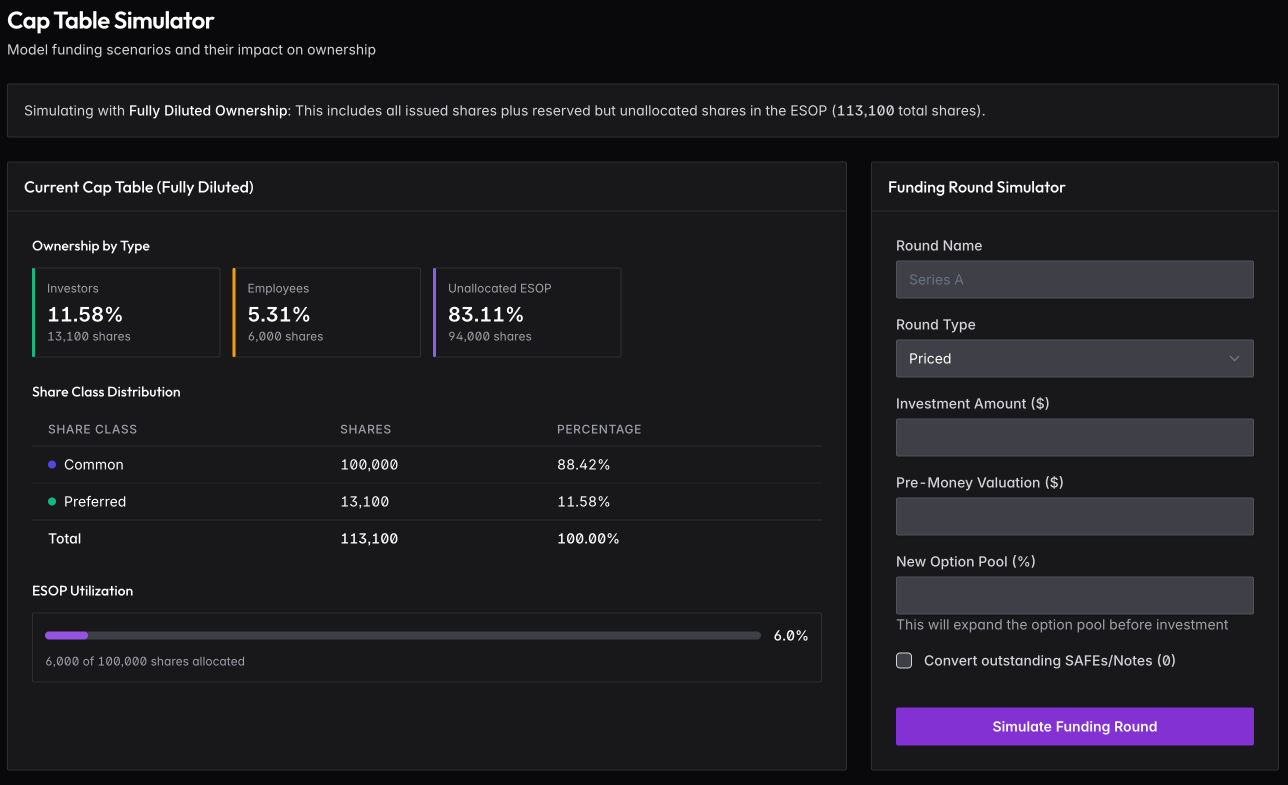
How It Works
The left panel shows your current cap table as it stands today. The right panel lets you input terms for a hypothetical round: round name, type (Priced, SAFE, or Note), investment amount, pre-money valuation, and option pool expansion.
Click Simulate Funding Round to see the results — a side-by-side comparison of ownership before and after, showing exactly how much each group gets diluted.
What to Model
Founder dilution — see how much you’ll own post-round at different valuations.
ESOP expansion impact — investors often require option pool expansion as part of the deal. This dilutes founders on a pre-money basis. Run simulations with and without to understand the real cost.
SAFE conversion — toggle “Convert outstanding SAFEs/Notes” to see how your existing convertibles affect the round.
Target ownership — if you know what percentage you want to retain, adjust the valuation until you hit your target.
Limitations
The simulator doesn’t model complex preference stacks or liquidation preferences. Results don’t save — take screenshots of scenarios you want to reference later.