Last updated: June 11, 2026
Investor Updates
Keep investors informed with regular updates about your progress, financials, and key metrics.

Generating an Update
Click Generate Update once the previous month is closed and your numbers are synced. The system pulls your financials and metrics automatically — no manual data entry.
Add qualitative context in three sections:
Business Update — what happened, key wins, challenges, product progress.
Financial Update — commentary on the numbers, runway, burn rate changes.
Asks — what you need from investors: intros, advice, hiring help, follow-on interest.
All content is editable. Click any section to modify and it auto-saves.
Sharing Updates
Updates start as private drafts. When ready, click Share to make it available to investors. Set an expiration date if you want the link to auto-expire.
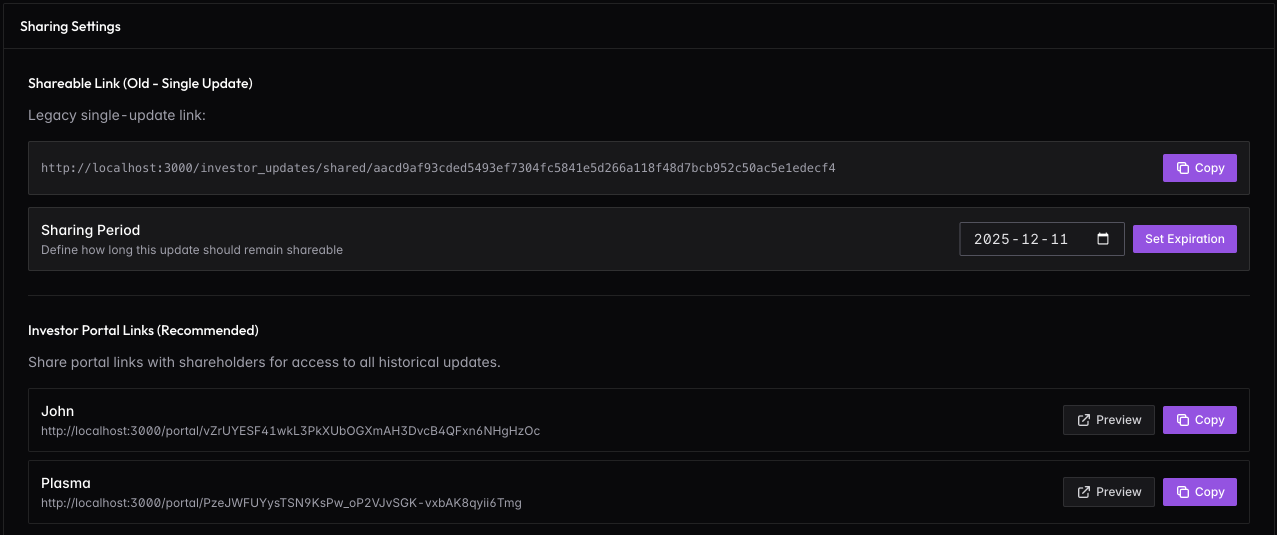
Two sharing options:
Single-update link — a shareable URL for just this update. Set an expiration date and copy the link to send via email.
Investor Portal links (recommended) — each shareholder with portal access gets a unique URL that shows all historical updates. This is cleaner than sending individual links each month. Copy their portal link from the shareholder detail page.